La WPM-testo estas evoluigita por taksi viajn vortojn pominute lerton kaj rapidecon. Vi povas praktiki tuŝan tajpadon krom tajpaj testoj por plibonigi vian kapablon!
| Accuracy | Percentile | |||
|---|---|---|---|---|
| Correct Keystrokes | Correct words | |||
| Wrong Keystrokes | Wrong words |
History
| WPM | Accuracy | Percentile | Keys | Words | Time |
|---|
Vortoj por Minuta Testo
Ĝi eble ne estas tiel facila kiel ĝi ŝajnas tajpi. Vi ja postulas certajn tajpkapablojn por la rapidtesto. La persono devos kontinue ekzerci. Vi povas plenumi ĉiutagan WPM-teston por atingi vian tajpan rapidecan celon. Ĉi tiu ekzerco mezuras vian vort-po-minutan eliron.
Vi povas taksi vian nivelon de tajpa lerteco uzante ĉi tiun interretan testilon de tajpado de WPM. La testo por minuto de Vorto ne nur determinas viajn tajpkapablojn je minuto sed ankaŭ koncentriĝas pri helpi vin pliboniĝi pri precizeco. Utiligante la precizecan procenton, vi povas determini kiom da vortoj vi skribis en minuto. La rezulto de la testo estas determinita de du variabloj. la precizeco kaj rapideco de tajpado. Vi devus konscii, ke dividado de longa vorto ankaŭ valoras.
Vi povas elekti el ses malsamaj metodoj de tajpa rapida testado laŭ viaj bezonoj. Uzu la 1-minutan aŭ 2-minutan testan motoron por taksi vian tajpan rapidon. Uzu la 10- aŭ 5-minutan ekzamenon se vi volas praktiki tajpadon.
Kial Mi Bezonas Tajpan Rapidan Teston?
Simple dirite, nia tajpa testo wpm permesas al vi taksi vian tajpa rapidecon kun tempo kaj helpas vin pli bone taksi viajn nunajn kapablojn. Ĉi tio estas necesa paŝo por disvolvi vian plenan potencialon kaj determini kiom da tempo dediĉi al ĉiutagaj tajpaj ekzercoj.
Ekzemple, oni konsilas taksi viajn tajpkapablojn antaŭ ol ŝanĝi al la 10-fingra tajpa metodo kaj komenci vian praktikon. Ĉi tio ebligas al vi poste kompari vian progreson kun la 10-fingro aliro al via antaŭa tajpa metodo kaj fari pliajn tajptestojn uzante ĉiujn dek fingrojn.
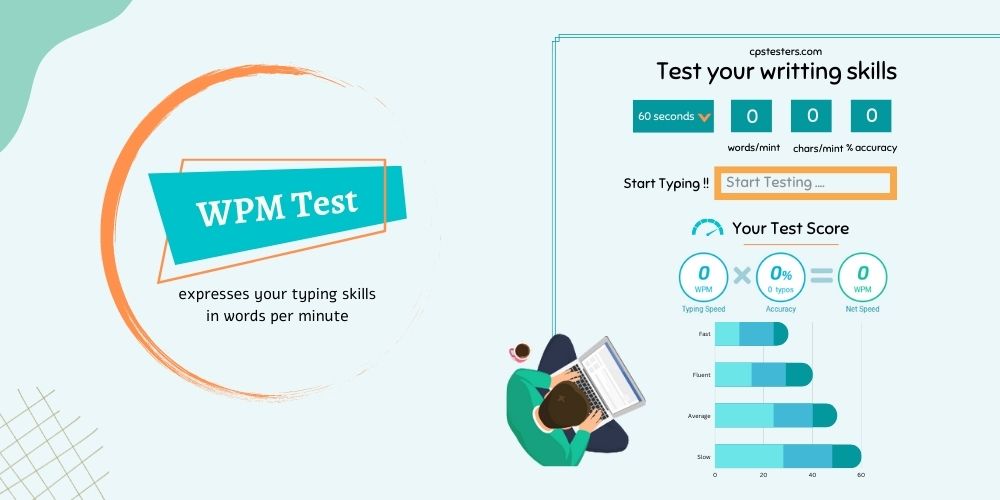
Vi povas uzi la provon de tajpado por minuto por rutine kontroli vian tajpa rapidecon kaj observi kiel vi pliboniĝis per ĉiutaga uzo, se vi jam komfortas kun viaj tajpaj kapabloj kaj ne trejnis dum longa tempo.
WPM-Testo Interreta
Por taksi vian tajpan rapidecon, uzu nian interretan tajpan teston. Por doni al vi rapidan kaj simplan manieron taksi vian tajpan rapidecon, ni kreis ĉi tiun senpagan tajpan teston. Ĝi povas helpi vin taksi vian evoluon dum vi praktikas tajpadon, donante al vi senton pri kiom bone vi fartas.
- Uzante ĉi tiun ilon, vi povas ekscii precize kiom da vortoj vi tajpis en minuto.
- Estas bazaj, tradiciaj kaj altnivelaj testoj haveblaj.
- La ilo inkluzivas kronometron kun diversaj sekundoj, same kiel vortprecizecon, la nombron da vortoj, kiujn vi tajpis en minuto, kaj la totalan nombron da tajperaroj.
- Vi povas elekti malsaman duan daŭron, kiel 1,3,5 sekundoj.
- Vi devas enigi komencan poentaron en la provizita tekstujo por komenci la teston.
- Via tajpa rapideco estos taksita dum vi tajpas.
- Kiam la tempigilo eksvalidiĝas, vi povas vidi la rezultojn. Vi ankaŭ povas dividi ĉi tiujn rezultojn reklamtestojn kun viaj geamikoj.
Vi Povas Kontroli La Klavaron Per Klavara Testo Interrete Antaŭ tajpi Teston!
La Tajpa Komplekseco
Individua uzanto povas elekti ajnan nivelon de tajpa komplekseco. La uzanto havas senliman aliron kaj estas libera uzebla.
Facila
Elektante ĉi tiun reĝimon helpos komencantojn en ekzercado de vortoj por minuto. Ĝi estas simpla kaj simpla tajpa metodo por novaj uzantoj.
Meza
Ĉi tiu tajpa reĝimo estas unu nivelo pli kompleksa ol Facila. Ĉi tiu reĝimo estas alirebla por uzantoj, kiuj trapasis la lernadon.
Malfacile
La plej malfacila nivelo por altigi vian tajpan poentaron estas Malmola. Nur por oficiale dungitaj profesiuloj.
Kial Gravas Tajpa Rapido?
Vi povas koncentriĝi pri via ĉefa tasko uzante tuŝan tajpadon. Vi spertas signifajn gajnojn de produktiveco kiam vi malpli zorgas pri via tajpa rapideco. Ĝi certigas doni rezulton pli bonan kaj de plej alta normo. Via laboro estos multe pli aprezata, kaj vi faros multe malpli da tajpaj eraroj. Vi povus paroli pli klare kaj rapide.
Kiel vi povas altgradigi vian Tajpan Rapidon?
Vi devas pensi pri maniero pliigi vian tajpa rapidecon se vi volas plibonigi vian laborkapablon. Sed kiel vi faras ĝin?
Jen kelkaj efikaj sugestoj por plibonigi vian tajpadon:
Ĝusta Tajpaj Metodoj
Vi povas plibonigi vian tajprapidecon uzante taŭgajn tajppraktikojn. La tuŝ-tajpa metodo, kiu devigas uzantojn enmemorigi la klavojn kaj konservi bonan manpozicion sur sia klavaro, estas rekomendita de pluraj specialistoj.
Elektante la Plej Bonan Klavaron
Por tajpaj taskoj, spertuloj konsilas uzi la plej bonan klavaron. La ĉefa areo, kie vi devus senti vin komforta, estas ĉe la klavaro.
Ĉu interretaj tajpaj testoj helpas pliigi tajpadon?
En resumo, ne. Tia programo nur povas mezuri vian tajpan rapidecon. Vi devas ekzerci, se vi volas akceli vian tajpadon. Kompreneble, vi povas praktiki tajpadon per ĉi tiuj interretaj tajpadaj testoj.
Multaj el vi eble demandas, kial mi bezonus tajpan programon kiam mi jam havas Microsoft Word kaj povas ekzerci. Jes, vi povas ekzerci tajpi per iu ajn tekstprilabora programo. Tamen, mi konsilas uzi nian interretan tajpan testmotoron por ekzerci, ĉar ĝi provizas al vi detalan WPM kaj precizecan raporton por helpi vin korekti viajn erarojn.

Eĉ dum MS Word ankaŭ ofertas erarraporton, vi devas permane kalkuli ĝin ĉiufoje kiam vi ekzercas. Kaj ĉi tio povas igi vin perdi vian tutan intereson en ekzercado.
Metante sian tutan atenton sur rapidecon, preskaŭ ĉiu studento faras ĉi tiun kritikan eraron. Estus bonege, se vi nur koncentriĝu pri tajpado sen eraroj.
Memoru, ke precizeco gravas pli ol rapideco dum tajpado. Ekzemple, se via precizeco estas nur 85% sed via rapideco estas 100 WPM, vi bezonos tre longan tempon por korekti la erarojn. Vi rimarkos, ke via tipa tajpa rapideco signife malpliiĝos finfine.
Ĉu mi regule praktiku Tajpon?
Ne ekzistas io pli bona ol ĉiutagaj klasoj pri tajpado, tio estas certe. La ŝlosilo por disvolvi viajn tajpkapablojn estas praktiko. Vi tajpos pli rapide ju pli ofte vi uzos ĉi tiun tajpan teston.
Viaj skribkapabloj signife pliboniĝos se vi plurfoje praktikas tajpi dum dek minutoj. La WPM-testo estas dizajnita por subteni daŭrantan edukadon de tajpisto. Ni kontrolas vian evoluon por ke vi povu vidi kiel via tajpa lerteco kaj rapideco pliboniĝas laŭlonge de la tempo. Havi konsekvencan agadon estas esenca por disvolvi lertajn tajpkapablojn.
WPM-Provaj Profitoj
Ĉiu, kiu uzas komputilon, devas scii kiel tajpi. Vi povas facile koncentriĝi pri via laboro dum vi pli facile tajpas. Via fokuso estas deturnita de via celo kiam vi tajpas malrapide kaj korektas tajperarojn. Eksciu kiom bone vi tajpas helpe de nia altnivela tajpa testo.
Ni provizas al vi ĝisfundajn komentojn post ĉiu ekzameno. Ĝi havas datumojn pri via rapideco, kie vi malrapidiĝas kaj la specoj de eraroj, kiujn vi faras. Ĉiuj tiuj specifaĵoj estas esencaj por pliigi vian rapidecon.
Vi povas registriĝi por kontroli vian progreson. Vi povas kontroli progresajn diagramojn kaj konservi viajn tajptestrezultojn. La kapablo afiŝi mesaĝojn kaj respondi ajnajn tajp-rilatajn demandojn en nia forumo estas disponebla por registritaj uzantoj, kiuj trapasis tri aŭ pli da tajpataj taksoj.
Oftaj Demandoj
Kiel mi pliigas mian tajpan rapidon?
Ŝajnas, ke ekzistas du manieroj tajpi pli rapide: la plej rapida metodo estas lerni kiel tajpi ĝuste. Ludi la tajpludojn estas dua aliro por pliigi vian tajpadon. Ludi klavarajn agadojn kiel Nitro Type povas plibonigi vian tajpan rapidecon kaj altigi vian takson en vortoj je minuto.
Kio estas la averaĝa tajpa rapido?
La meza tajpa indico estas 40 vortoj je minuto (wpm). Iru por tajpa rapideco de 65 ĝis 70 vortoj minuto se vi deziras esti ekstreme produktiva.
Kiel vi praktikas la tajpan teston?
Por pliigi vian tajpan rapidecon, vi eble aliĝas al la specifitaj teknikoj. Regula klavarpraktiko dum sekvado de apartaj tajpaj reguloj estas saĝa elekto.
Kiom bonas 32 WPM?
Ĝi superas 7.13 procentojn de ĉiuj niaj uzantoj. Kerna forto estas la ŝlosilo por tuŝi tajpadon, do ju pli vi tajpas, des pli rapide vi fariĝas.
Ĉu tajpi je 100 wpm estas bona?
Vi verŝajne estas ludanto, retpirato aŭ geniulo se vi povas tajpi je 90 vortoj por minuto. Ĉiukaze, vi faras mirindan! 100 wpm aŭ pli: Vi apartenas al la plej bonaj 1% de tajpistoj!
Kio estas la plej rapida tajpa rapideco kiun iu ajn atingis?
La plej rapida skribmaŝino en la mondo, laŭ la Guinness World Records, estas Barbara Blackburn, kiu povas tajpi je alta rapideco de 212 WPM. La plej rapida tajpisto, laŭ IBM Corp., estas Stella Pajunas Garnand, kiu povas tajpi 216 vortojn en minuto. Ŝi surbendigis tiun kanton en 1946.
Kiel vi tajpas pli rapide?
Vi devas lerni kiel korekte starigi vin, uzi ĉiujn viajn fingrojn, premi la ĝustajn klavojn sen rigardi kaj malhelpi erarojn se vi volas skribi pli rapide. Vi gajnos el tajpa trejnado se vi ne lernis iun el ĉi tiuj kapabloj.
Kiel mi trovas mian wpm?
La testo por minuto de vortoj, aŭ WPM-testo, estas la plej simpla maniero por taksi rapidecon de tajpado. La “vorto” konsistas el 5 signoj averaĝe. Simple dividu la nombron da vortoj entajpitaj en minuto sen tajperaroj per kvin por determini WPM. Via tajpa rapideco estus 20 WPM, ekzemple, se vi tajpus 100 vortojn je minuto, inkluzive de spacoj.
Iuj Aliaj Klavaraj Iloj:


