La Jitter Click Test estas klakteknika ludo, kiu estas uzata de ludantoj por kontroli sian musklakan rapidon.
- 1 Second Test
- 2 Second Test
- 5 Second Test
- 10 Second Test
- 15 Second Test
- 30 Second Test
- 60 Second Test
- 100 Second Test







La valoro de klakrapideco estas komprenita de seriozaj ludantoj, precipe en klakludoj kiel Minecraft kaj Farmville. Estas surprize lerni, ke vi devas uzi teknikon, ĉar vi ne povas nur praktiki viajn rapidojn.
Sofistika kaj bonega klaktaktiko, kiu povas helpi vin signife altigi vian klakkalkulon, estas klakado kun tremo. Uzantoj povas atingi altan klakrapidecon de 10 ĝis 14 CPS uzante tremklakadon. La manaj kaj pojnaj muskoloj tremos, kaj vi povas uzi ĉi tiujn vibrojn por premi la kursoron kiel eble plej rapide.
Fariĝi spertulo pri ĉi tiu altnivela klaktekniko, tamen, postulas iom da praktiko. Provu la teston de tremo-klako por determini ĉu vi iras al perfekteco kaj monitoru vian evoluon laŭlonge de la tempo por vidi kiom proksime vi estas.
Kio estas la Jitter Test?
La “Minecraft” komunumo kreis la Jitter-teston, klakteston. Interreta senpaga ilo nomata “jitter-testo” serĉas testi kaj mezuri vian klakrapidecon. La jitterclick-testo kalkulas kiom da musklakoj uzantoj faras en antaŭdeterminita tempodaŭro.
Jitter Click estas kompleksa metodo bati la muskursonon por produkti rapidan klakadon. Por atingi klakrapidecon kiu estas pli ol duoble pli rapida ol regula klakado, estas uzata unika stilo de klakado nomata “Jitter Clicking”.
Jitter Klakado
Kiam vi uzas la teknikon de tremo-klako, vi premas la muskursonon tre rapide por produkti reguligitajn manvibrojn kiuj tiam estas transdonitaj al la fingro, produktante plurajn musklakojn en mallonga periodo.
La ideo de tremoklakado estas premi la muson pli rapide ol homo povas. Por efika efikeco, la natura korfrekvenco de persono en ripozo povas varii de 60 ĝis 80 batoj minuto (bpm).
Ĉar muso povas klaki duoble pli multajn fojojn je sekundo ol ni homoj, kiuj moviĝas pli malrapide sur niaj piedoj, ili ofte havas pli proksimajn rapidecojn de proksimume 200 fps.
La celo de tremoklakado estas doni al vi la kapablon pliigi viajn klakojn ĉiun sekundon, por ke vi povu ludi viajn plej ŝatatajn ludojn kontraŭ tiuj aliaj ludantoj je pli alta nivelo de rendimento. En aliaj ludoj, kiel Minecraft, vi devas rapide klaki por alfronti viajn konkurantojn en PVP.
Via klaka indico devas rivali kun la supro por ke vi estu plej alta ludanto. Klaki rapide povas decidi la rezulton de iuj ludoj, tiel perfektigi ĉi tiun kapablon helpos nin atingi kie ni devas esti laŭ ludkapablo.
Kun tremoklakado, uzantoj povas atingi altajn klakprocentojn de 10 ĝis 14 CPS. Ĉi tio estas ĉar la pli malfortaj klakoj ebligas pli precizan poziciigon, kiu plibonigas la precizecon de fokuso sur la ekranaj regionoj kiuj plej postulas ĝin.
Ĉu vi interesiĝas pri Kohi Technique? Kontrolu Kohi Klaku Teston Nun
Jitter Klaku Enretan Teston
Ni dankas la industrion de la ludoj pro tio, ke ni havigas tian mirindan metodaron al niaj videoludaj amikoj. En tremklako, ekblovo de klakoj estas produktita uzante la tutajn brakmuskolojn prefere ol nur la fingromuskolojn.
Malstreĉigu viajn manojn kaj brakmuskolojn antaŭ ol meti vian dominan fingron malpeze sur la pinton de la kursora butono por krei tremklakon.
Tiam, anstataŭ klaki la musbutonon per viaj fingroj, skuu viajn manmuskolojn por produkti eksplodon de movado, kiu fine produktas altan nombron da klakoj sekundo.
Kvankam oni menciis la teĥnikon de la musa klako, kiel oni diras, bonegaj aferoj postulas tempon. Nur per ampleksaj, kontinuaj praktiksesioj de nulo, vi povas regi ĝin.
Plej Rapida Klaka Ludo, Jitter
La Jitter CPS-Testo estas laŭdire malfacila tekniko en CPS-programoj. Tamen, por amatoraj ludantoj, ĝi devas esti malfacila, dum por spertaj aŭ profesiaj ludantoj, ĝi devas esti simpla. Iuj novuloj aŭ komencantoj povas sperti streĉon aŭ spasmon en sia mano, palmo, pojno aŭ fingroj. La streĉa testo povas preni iom da kutimiĝo por novuloj. Ĉi tiu tekniko ankaŭ estas nomata frapa.
Interretaj pafantoj, arkado kaj PUBG-ludoj ĉiuj uzas ĉi tiun aplikaĵon. Ludantoj en ĉi tiuj ludoj devas esti rapidaj klakantoj, kaj ili ankaŭ devas celi rapide. Ĉi tio ankaŭ povas esti agordita por 10 sekundoj, 30 sekundoj, 60 sekundoj aŭ 100 sekundoj.
Kvankam iuj asertas, ke ĝi estas danĝera, estas universala vero, ke tro da io ajn estas venena. Tial vi devas permesi al vi ripozon kiam ajn via brako aŭ mano komencas krampi. Sed kun la tempo, novuloj kaj amatoroj evoluas ankaŭ al spertuloj. En unu peco, bloganto asertis ke lia amiko, kiu ekzercis longajn horojn, disvolvis doloron kaj haŭtan erupcion pro uzado de muskuseto. Vi ankoraŭ zorgu, sed la artikolo neniam estis validigita.
Jitter Klaku Testaj Trajtoj
Ĉi tiu ludo estas optimumigita por mirinda sperto de uzanto, kiel la aliaj ludoj. Por perfektigi siajn kapablojn en ludanto kontraŭ ludanto, batalado kaj aliaj ludreĝimoj de Minecraft, ludantoj povas uzi ĉi tiun klakteston, kiu estas specife kreita por ili.
Krome, vi povas testi vian klakprocenton sen neceso instali iun ajn fantaziajn ludojn aŭ programojn. Do, puŝu vin al la maksimumo kaj partoprenu la klakmaratonojn por taksi vian klakrapidecon kaj trejniĝu por perfektigi ĝin.
Kiel Elekti la Plej Bona Aparato por Jitter Klakado?
Sekve, elekti la ĝustan frapetan aparaton estas pli decida ol io alia en ĉi tiu klaka testo. Kiel vi povus superi rivalojn se vi mankas la necesa ilo?
Sekve, havi la dekstran muson povus havigi al vi signifan konkurencivan avantaĝon super viaj rivaloj, eĉ se via celo estas plenumi la plej trejnajn klaktestojn iam ajn.

Elektante la taŭgan aparaton, vi devas atenti ĉi tiujn trajtojn.
- Ĉar ĝi estos submetita al multe da martelado, via kursoro estu nedetruebla.
- Elektu avangardan teknologion kaj uzu optikajn kaj laserajn musojn prefere ol konvenciajn kaj mekanikajn.
- Fine, elektu muson, kiu sentas vin komforta en viaj fingroj kaj estas la ĝusta grandeco por viaj manoj.
La Celo de Jitter Clicking
En ludoj, tremoklakado estas signifa. Ĝi permesas al la ludanto klaki multajn fojojn je sekundo, ebligante ilin akiri pli da sukcesoj kaj kaŭzi pli da damaĝo en ludoj kiel Minecraft kaj mi-perspektivaj pafistoj. Uzantoj, kiuj uzas la tremklakan funkcion de Minecraft, havas pli da lud-sukceso. Por produkti rapidan klakadon, tremklakado estas ĉefe uzata.
Vi povas plenumi la Teston pri Tremota Klako por taksi vian efikecon aŭ por pliigi klakrapidecon. Provu la Jitter-Clicking-In-Game aŭ la Jitter-Clicking-Testers por akiri trejnadon pri trejna klako. Vi povus monitori la progresojn de via CPS tiamaniere.
Sugestoj por Plibonigi Jitter Klakado
Aĉetu bonan muson
Provu eviti uzi polvokovritan muson de la 1980-aj jaroj, eĉ se ĝi estas produkto SteelSeries, Logitech aŭ Razer. Ĝi helpas havi bonan muson kiam trem-klako.
Dum vi tenas vian muson
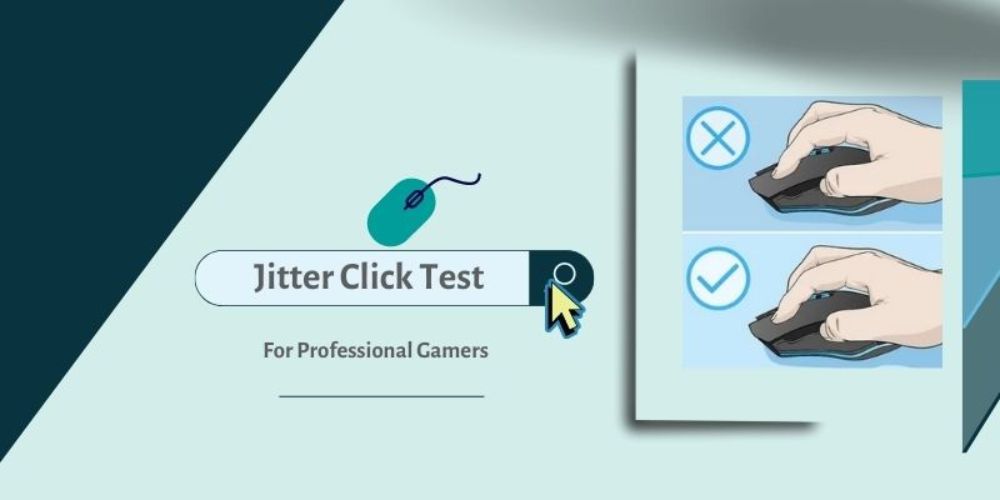
Povus esti malfacile por vi kapti vian muson kaj uzi ĝin por celi dum vi tremklakas. Pro tio, teni la muson postulas uzi nur viajn fingropintojn anstataŭ vian kompletan manon.
Via mano estas streĉita
Via mano vibras plej multe kiam vi trem-klakas, tamen ĝi estas ankoraŭ sufiĉe forta por premi la muson. Via pojno devas esti iomete levita de la muso dum via fingro estu sur la maldekstra klakkuseneto. Ĝi ne povas esti malstreĉita iel. Certigu, ke vi faras oftajn paŭzojn.
Ĉu vi volas testi vian dekstran klakrapidecon? Kontrolu Dekstre Klaku CPS-Testo
Tenu vian fingron senmove
Trema klakado ne postulas, ke vi klaku la kursoron per via fingro. Konservu vian fingron en pozicio tiel ke vi nur povas klaki la muson per la vibroj de viaj brakoj.
Preciza brako celo
Ĉu vi estas pojno celanta, tremklako ne funkcios tre bone. Do, vi povas celi prefere ol fari ĝin multe pli preciza. Vi devas atingi ĉi tion ŝlosante vian pojnon en loko kaj movante vian tutan brakon kiam vi devas celi.
Klinu vian manon
Via mano ne devas tute ĉirkaŭi vian muson. La maldekstra klakbutono devas esti sub via fingro, kaj ĝi devus esti iomete arkigita. Memoru, ke ĉi tio povas fariĝi teda kaj ke ĝustigi ĝin postulas praktikon.
Daŭre praktiku
Majstri ĉi tion povus preni iom da tempo. Uzu trem-klakadon dum ludado kaj provu vian klakrapidecon. Kiam vi havas muson kiu ne estas enŝovita, provu tremi dum kelkaj sekundoj samtempe. Ĝi fine fariĝos normala. Se vi sukcesas, vi devus akiri inter 7-9. Vi povus atingi 12 cps se vi perfektigas la kapablon.
Kiu muso estas ideala por Jittery Klakado?
La aparato kun la plej novaj novigoj kaj, plej esenca, tiu, kiun vi sentas pli komforta uzante kaj kiu sentas sufiĉe bone en viaj manplatoj, estas la plej bonega por tremklakado.
Kiam vi elektas la plej bonan muson por pliigi viajn klakojn je sekundo, estas pluraj aspektoj por atenti.
Fortikeco
- Vi devas havi daŭran muson unue. Ĉar vi klakos rapide kaj postlasos multajn klakajn impresojn.
- Vi foje bezonas klaki signife pli forte ol kutime; daŭrema muso tipe pluvivos pli longe.
Mekanika kontraŭ Optika Ŝaltilo
- La konvencia (Mekanika) muso sendas elektran signalon al la komputiloj por komuniki klakan informon.
- Optikaj ŝaltiloj muso komunikas informojn per io kiel lumfasko kaj faras tion tuj post klakado, dum ĝi bezonas pli da tempo ol ĉi-lasta. Kompare kun la konvencia ŝaltilo, ĝi estas multe pli rapida.
The Jitter Click Test: Ĉu ĝi estas damaĝa al via Sano?
Ni volas doni averton ĉar konservi sian sanon estas kerna. Limigu la kvanton da tempo, kiun vi pasigas klakante. Surbaze de via ofteco, alta rapideco de tremoklakoj povas eventuale rezultigi problemojn kun viaj fingroj kaj artikoj (kiel ekzemple Karpa Tunela Sindromo). La efiko al sano ankoraŭ ĉeestas kvankam ĝi ne povas esti kvantigita.
Se vi klakas kun rapideco de inter 9 kaj 15cps, tremklakado estas sekura. Evitu preterpasi la limon de 15–30 sekundoj. Ĉi tio povas kaŭzi severan longdaŭran doloron al viaj fingroj, pojno, brako kaj mano. Kiam vi klakas preter via komforta zono, ĝi povus grave damaĝi vian manon.
Malhelpi Fizikan Difekton de Tremota Klakado
Kiel vi konscias, uzi ĉi tiun teknikon faros tro da premo sur vian pojnon. Kiam vigla klakado, estas danĝero, ke vi povus suferi fizikan damaĝon.
Celu uzi ĉi tiun metodon dum ne pli ol kelkaj sekundoj samtempe. Post plenumi la provon de la streĉa klako-rapideco, vi ĉiam devas doni al via mano iom da tempo por malstreĉiĝi.
Prenante ĉi tiujn sekurecajn mezurojn, vi povas helpi la reakiron de via mano de la premo kaj malhelpi iujn ajn longtempajn sanproblemojn.
Karpa Tunela Sindromo estas inter la plej tipaj aferoj, kiuj povus disvolviĝi pro kontinua tremoklakado. La kunpremo de la nerva radiko en la antaŭbrako estas medicina komplikaĵo.
Malgraŭ la manko de konkretaj pruvoj, mezuroj ĉiam devas esti prenitaj dum traktado de tremoklakado kaj CTS.
Demandoj pri Tremo de Klakado
Kiel mi povas tremi klaki per malbona aŭ norma muso?
Kvankam tremoklakado postulas taŭgan muson, vi tamen povas atingi pozitivajn rezultojn uzante norman aŭ malmodernan muson. Tial, por optimumaj rezultoj, tenu aferojn simplaj kaj generu multajn klakojn uzante vian tutan brakon. Evitu esti tro malglata pri malnovaj aparatoj ĉar tremklakado povas detrui ilin.
Kiom rapide iras Jitter Clicking?
Estas simple atingi 9-12 klakojn je sekundo por iu, kiu praktikas tremklakon. Ĝi povas pliiĝi al 15 CPS en certaj cirkonstancoj.
Kiom da CPS la Jitter Klakas?
Sperta uzanto povas plenumi 6 CPS, aŭ klakojn je sekundo, averaĝe. Tamen, ĉar Jitter Clicking inkluzivas manajn vibradojn, homoj povas atingi ĝis 10 ĝis 14 CPS dum Jitter Klakado. Ĝis 14CPS nur povas atingi profesiuloj.
Ĉu via muso povas rompi per Jittery Klakado?
Ne, ĝi ne rompas vian muson, sed ĝi draste mallongigas ĝian vivdaŭron.
Kiom ofte vi devus uzi Jitter Click?
Kelkfoje tage, laboru pri rapida klakado, sed ne forgesu la bazaĵojn. Por pliigita efikeco, provu alternativajn metodojn kaj uzu komfortan muson
Finante Jitter CPS-Testo
Uzante la treman klakan metodon, vi povas klaki rapide kaj ripete. Ĉi tiu metodo plej taŭgas por vi se vi ĝuas klakintensajn videoludojn. Vi povas lerni fari tremklakadon per ekzercado.
Praktiko por viaj klakoj-testado estas la ŝlosilo por akiri la plej grandan CPS. Tamen, vi ankaŭ devas certigi, ke via videoludada muso havas sufiĉe da ŝlosiloj por akomodi ĉiujn viajn klakojn. Se vi ne povas fari tion, faru paŭzojn dum sesioj kaj evitu tro malmolan.
Aliaj Klakaj Ludoj Pri kiuj Niaj Spektantoj Montris Intereson:


